As organisations move towards centralised IT infrastructures, virtualisation and containerisation have become very commonplace. But where many IT departments face confusion is which platform ...

Masum Shamjad
Founder & CEO


April 14, 2026
As organisations move towards centralised IT infrastructures, virtualisation and containerisation have become very commonplace. But where many IT departments face confusion is which platform virtualization software to use. Two that come to the forefront in these discussions are VMware and Proxmox. To choose which one is right for your organisation, it’s important to understand where they differ and what are common.VMware is a pioneer in the virtualisation space. With 24 years of history, their solutions have gained mass popularity among organisations world-wide. Proxmox entered the scene much later in 2014, but has become a favourite among server enthusiasts because of its opensource solutions.
ESXi is VMware’s most popular offering. It is a bare-metal or Type-1 hypervisor for host machines. Being bare metal means the software runs directly on the hardware without an OS underneath. ESXi integrates its own microkernel, called vmkernel.
VMware also offers vCenter - a platform for centralised monitoring and management. With vCenter, multiple VMware ESXi servers can be monitored and controlled. Features like High Availability (HA) and clustering are also available through vCenter.
For organisations looking to shift to the cloud or operate mixed cloud, VMware offers vSphere. vSphere is their flagship solution, that integrates all ESXi and vCenter’s functionality and adds many more features. It is very scalable and adds hybrid infrastructure capabilities.
VMware also offers vSAN, their proprietary storage solution, which can be used to implement disaster recovery and ransomware protections.
Proxmox’s main offering is their Virtual Environment, commonly called Proxmox VE. Proxmox VE is a type-2 hypervisor, meaning it runs on top of an OS like Windows or Linux. It natively supports a range of features such as clustering and high availability without need for any additional software. Third party tool integration is possible with an included REST API.
Proxmox VE supports both containerisation through LXC (Linux Containers), and full virtualisation through KVM (kernel-based virtualization). It includes a built-in HA manager, allowing individual VMs to be configured for HA using the Corosync Cluster Engine. In case of hardware failovers, VMs can be transferred over nodes. Even live migration is possible without downtime between live nodes. Proxmox VE also includes vzdump, a backup utility that enables data compression and snapshot mode for increased ressiliance.
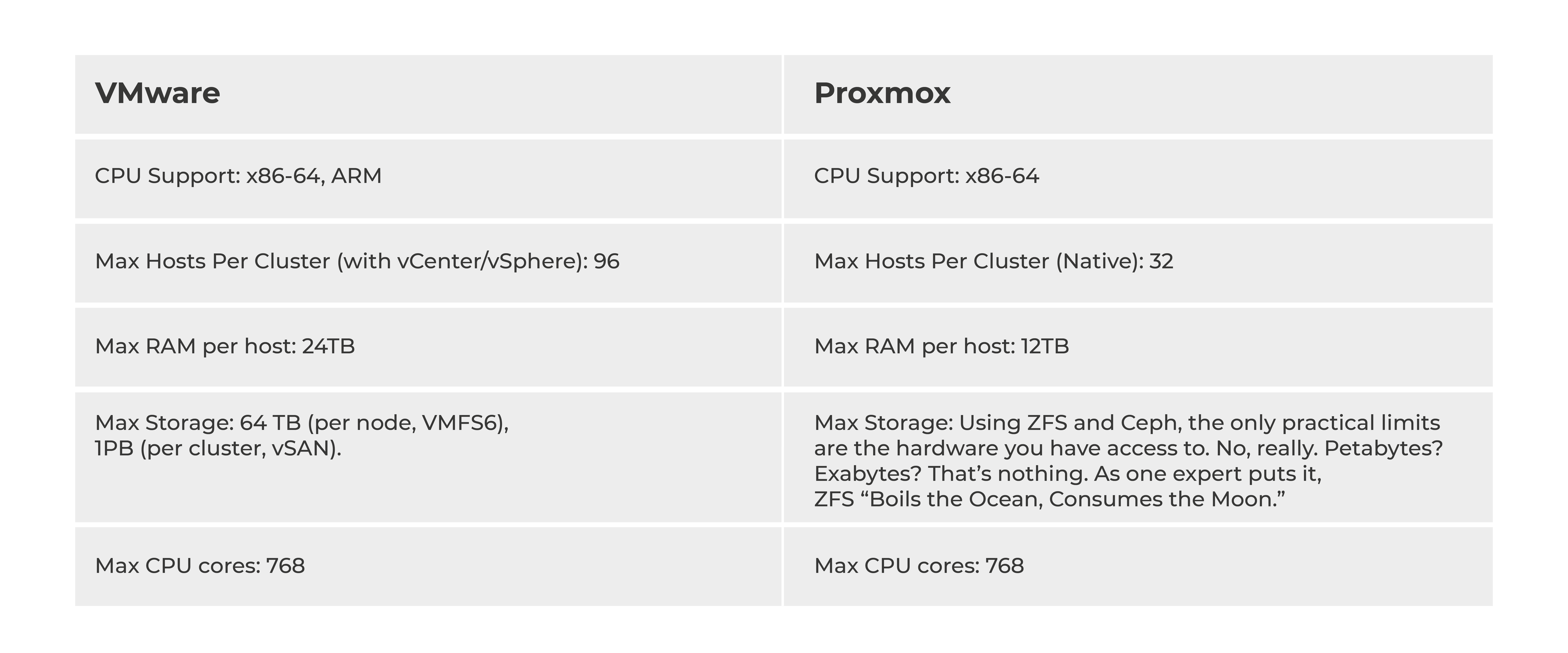
Hardware Limitations: VMware VS Proxmox
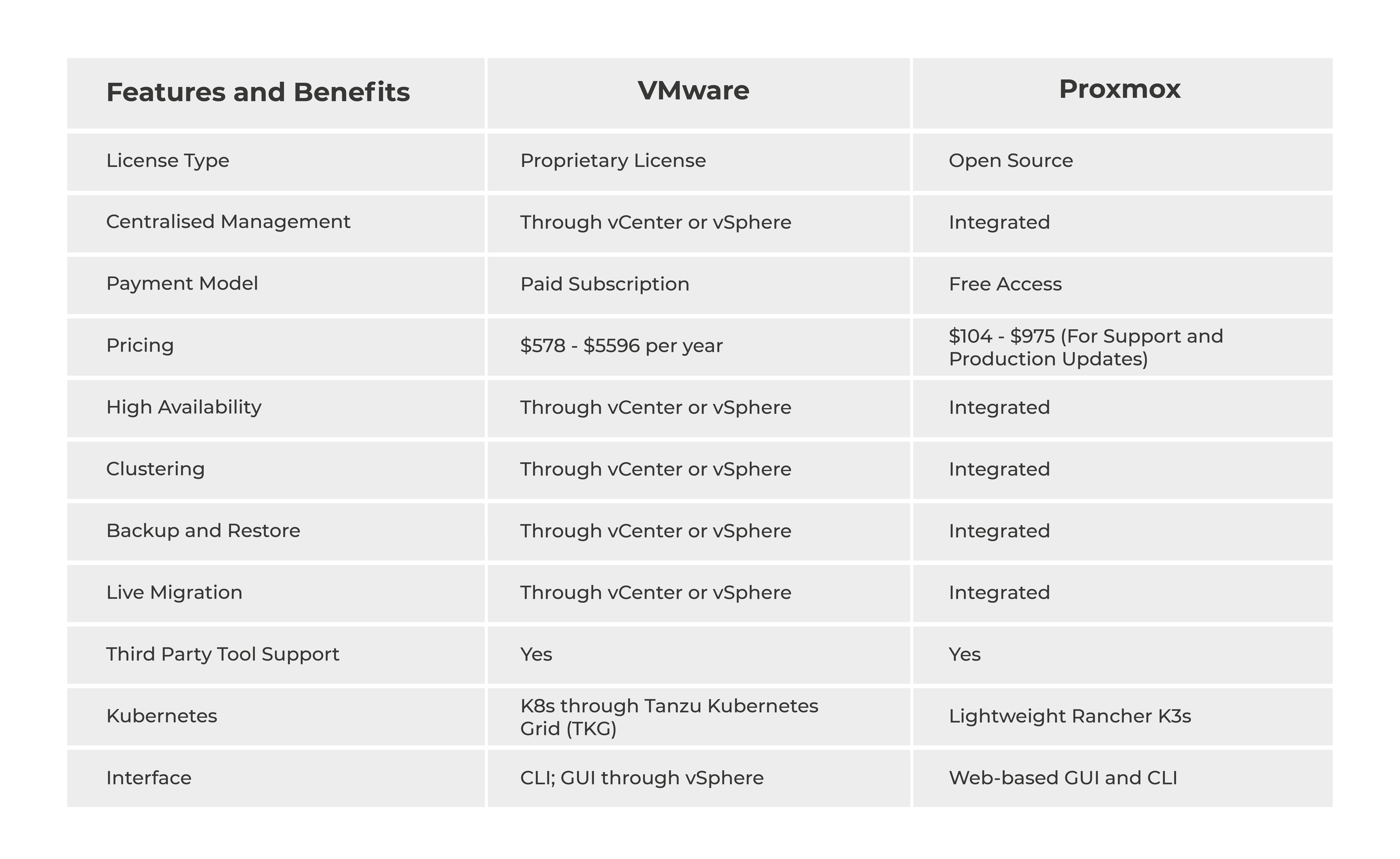
Key Features and Benefits
Proxmox at a Glance
Pros:
Cons:
VMware at a glance
Pros:
Cons:
It is clear that while many features are available from both solutions, they are for very different customers.
For small to medium-sized organisations, Proxmox makes a lot more sense. Its free opensource nature means far lower overhead costs. It has a wide selection of advance features built-in, and subscription is optional.
If you:
You are better off with Proxmox for your virtualisation needs.However, for very large organisations, VMware is usually necessary. When you need more than 32 hosts per cluster, the subscription price isn’t really an issue. At very large deployment scales, VMware is basically necessary. At that point, you will need to get the full vSphere suite, and your organisation can afford it too.
Contact Us
Get in touch with our team anytime today.
Our team is always here to listen, support, and guide you.

Stay informed with instant updates delivered straight to your inbox.

Providing top-notch technology solutions that you can trust to transform your growing business
Services
Get In Touch

Ahmedabad
714, Shivalik Shilp, Iscon Cross Road, SG Highway, Satellite, Ahmedabad – 380015, Gujarat, India.
+91 7984127792© 2011-2026 TulipTech | All Rights Reserved