Most app projects that go wrong do not fail at the keyboard. They fail in the decisions made before and around the build: a skipped discovery, the wrong platform, a partner chosen on price, a scope that grew until the budget ran out.
We see the same failures repeat across UK businesses, and almost none of them are coding failures. They are process failures, and process failures are preventable once you know where they hide.
This guide walks the full application development process the way a 14-year practitioner runs it: the phases, the approach and tech choices, where AI now genuinely helps, the real UK costs including the ones quotes omit, and the failure modes that derail teams. Follow it and your app ships; ignore it and you join the debrief.
Why most app projects fail, and what this guide fixes
Before the steps, the honest framing: the technology is rarely the problem. The most common causes of a failed UK app build are a brief that was never validated, scope that crept after sign-off, a platform chosen for the wrong reason, and a partner picked on day rate alone.
Each of those is a decision, not a bug, and each has a known prevention. For the full cost picture behind these decisions, our App Development Cost guide breaks the numbers down; this guide is about the process that spends them well.
We were once handed a half-built app to rescue where the founder had spent six months and a five-figure budget before a single user had been asked whether they wanted it. The code was sound; the problem was that nobody needed the product. That is the failure this guide is built to prevent.
The phases below are sequenced so that each one closes a failure mode before it can open. Skip a phase and it returns later as rework, usually at the worst possible time.
Phase one: validate the idea before you build
The first phase is the one most founders rush, and skipping it is the single most expensive shortcut in app development. Validation is the deliberate hunt for evidence that real people have a problem worth paying to solve, before a line of code is written.
Talk to 20 to 30 people in your target audience about their current behaviour, not your solution. Run a landing-page test to measure whether the promise resonates. If you serve businesses, get a few letters of intent before you build.
The output is a one-page memo naming the user, the problem, the evidence, and the assumption the app must test, and it doubles as your first set of application development requirements. Without it, every later conversation drifts.
Research the app market and your competitors
Validation tells you the problem is real; market research tells you whether you can win. The global app market is projected to reach about $781 billion by 2029, according to Statista, but a growing market does not make any single app more likely to succeed.
Spend a day in the app stores reading the reviews of the apps your users already rely on. The one-star reviews are a free backlog of unmet needs, and the five-star reviews tell you the table stakes you cannot skip.
Map the three or four apps competing for the same attention, then write a one-line position: what you do that they do not. A lightweight strengths and weaknesses pass on each rival is enough at this stage; a six-month market study is not.
A validated idea is also a cheaper build, because it lets you cut the feature list to what the evidence supports rather than what the founder imagined.
Phase two: define scope and choose your approach
With the idea validated, you decide what to build and how to build it, which is the heart of your application development strategy. Scope is where budgets are won or lost, so split the feature list into a must-have set for launch and a later backlog, and hold the must-have list to five items or fewer.
We have seen a launch feature list of forty items cut to six in a single workshop, and the app shipped months sooner for it. Nothing that mattered was lost; what went was the work that felt essential in a meeting and proved irrelevant to a real user.
Native, cross-platform, web, or PWA
The build approach sets the cost and the ceiling. Native iOS in Swift and Android in Kotlin give the deepest hardware access at the highest cost, because every feature is built twice.
Cross-platform with React Native or Flutter ships one codebase to both platforms at 25 to 40 percent less, which suits most first apps. A web app or progressive web app avoids the app stores entirely and is 30 to 50 percent cheaper, suiting content-led or internal products.
Choose the approach from your users and roadmap, not from what sounds advanced in a board paper, because the wrong choice here is a doubled budget discovered late.
Which tech stack to choose for your app
The approach decides the cost; the stack decides the day-to-day of the build. For native, that means Swift on iOS and Kotlin on Android, the choice when the app leans on the camera, sensors, or heavy on-device performance.
For cross-platform, React Native and Flutter are the two mature options, and both ship one codebase to both stores. React Native suits teams already fluent in JavaScript, while Flutter gives tighter control of the interface, so the right pick follows your team, not the trend.
On the server side, Node.js, .NET, and Python all serve well, paired with a relational database such as PostgreSQL for structured data or a document store for flexible records. Choose the stack your partner already knows deeply, because a team writing in a familiar language ships faster and breaks less.
No-code versus custom
No-code platforms build a working app for a fraction of custom cost and suit internal tools and simple validation. The trap is treating that choice as permanent, because once you need real scale, custom logic, or to own your IP, no-code hits a ceiling and the migration costs roughly what building custom would have.
Use no-code to test demand cheaply, and build custom when you already know you will scale or integrate deeply. The honest cost of no-code is the rebuild, so decide with that in view.
Phase three: design and prototype
Design is not decoration; it is where you find the assumptions you did not know you were making about how users expect the app to work. Catching them in a prototype costs hours, while catching them in code costs weeks.
The sequence runs from information architecture to low-fidelity wireframes, then a style guide, then high-fidelity mockups, and finally a clickable prototype tested with five real users, which surfaces roughly 85 percent of usability problems. Accessibility belongs here too, because building to WCAG from the start costs a fraction of retrofitting it after launch.
The tools here are standard across the industry: Balsamiq or pen and paper for wireframes, then Figma or Adobe XD for the mockups and the clickable prototype. Shared design files let you and the team comment in one place, which removes the email threads that slow sign-off.
The output is a prototype a user has completed end to end without help, which becomes the blueprint the build works from. A signed-off prototype is also the cleanest brief you can hand a development team, because it removes the ambiguity that inflates quotes.
Phase four: build in tight sprints
The build is where most of the budget goes, and it runs best in two-week sprints, each ending with a working demo you review. Six to eight sprints is typical for a standard app, putting the build window at three to four months.
The work splits across the frontend the user sees, the backend that holds the logic and data, the DevOps and CI/CD pipeline that ships it safely, and the QA that tests every sprint rather than only at the end. A modern stack for most UK apps is React Native or Flutter on the front, Node.js, .NET, or Python on the back, REST APIs between them, and a cloud platform underneath. Insist on a written sprint summary each fortnight, because a build whose progress you cannot see is one you cannot steer.
The app backend and integrations you do not see
Most of an app's real complexity lives in the half the user never sees. The backend holds the logic, the data, and the rules, and the choices there decide how the app behaves when usage climbs.
Few apps stand alone, so plan the third-party integrations early: a payment gateway such as Stripe, maps, authentication, and push notifications each add build time and a running cost. Every integration is also a dependency you do not control, so a sensible build isolates each one behind a clean API.
Get the data model right at the start, because a database schema reworked after launch is one of the most expensive changes an app can face.
The sprint demo is non-negotiable, because a build that goes four weeks without one has lost its way.
Phase five: how AI changes the build in 2026
AI now sits on both sides of an app project, and a 2026 plan that ignores it is already dated. The first side is AI used to build the app: code generation, scaffolding, and automated test writing genuinely compress timelines, with realistic gains of 20 to 35 percent on the right work, though they shrink on complex, novel features and still need senior review.
The second side is AI features inside the app: assistants, smart search, recommendations, and predictive insights that users increasingly expect. These add a data and governance workstream, so budget for model integration, running costs that scale with usage, and the explainability and audit logging a regulated feature needs.
Validate an AI feature on an off-the-shelf model first, and invest in custom training only once the value is proven.
Phase six: test, launch, and iterate
Quality assurance runs throughout, not at the end, and the final sprint adds user acceptance testing where you and a few trusted users run the full app through real workflows. Budget a few weeks of beta testing through TestFlight or Google Play Console before the public launch.
Launch is a beginning, not a finish line. The first three months deliver more signal than the entire build, because real users behave nothing like the personas, so plan to measure activation, retention, and the core action, and iterate against what the data shows.
The app testing that catches what demos miss
A passing demo is not a tested app. Functional testing checks each feature does what it should, integration testing checks the parts work together, and performance testing checks the app holds up under real load rather than one user on fast office wifi.
Test on real devices, not just the simulator, because the cheap Android handset your users actually own behaves nothing like a top-end test phone. Security testing and accessibility checks belong in the same pass, and user acceptance testing then puts real people through the full workflow before launch.
The teams that skip this do not save time; they move the bugs from testing, where they are cheap, to live users, where they are expensive and public.
The app you launch is a hypothesis; the one that survives is the one you keep refining, and the launch itself has its own rules.
Launching on the app stores and getting found
A public launch means clearing the app store review, and the rules differ by platform. Apple's review is the stricter of the two and can reject on privacy, payments, or thin functionality, so read the guidelines before you submit rather than after a rejection costs a week.
Getting found is a separate job from getting approved. App store optimisation, the title, keywords, screenshots, and ratings that decide whether anyone discovers the app, matters as much as the build, because a strong app no one can find still fails.
Plan a launch beyond the store listing too: a landing page, a few launch partners, and a way to capture feedback from the first cohort. The first reviews shape the ranking, so the early days are worth managing closely. A staged rollout on Google Play, releasing to a small share of users first, lets you catch crashes before they reach everyone.
Getting your app found and keeping users after launch
App store optimisation is not a one-off launch task; it is the ongoing work of testing your title, keywords, and screenshots against what actually drives installs. Ratings feed the ranking, so prompt happy users to review at the right moment and answer every critical review in public.
Two tools earn their place from day one: an analytics layer such as Firebase or the app stores' own consoles, and push notifications. Analytics show you where users drop off, and well-judged notifications bring them back, which is the difference between an install and an active user.
Treat launch as the start of an acquisition budget, not the end of a build budget, because the best app still needs a reason for people to find it.
All of this depends on having the right people doing the work.
The team behind a successful build
An app is built by a team of specialists, and knowing the roles helps you read a proposal. A standard build needs a product owner or project manager, a UX and UI designer, frontend and backend developers, a QA tester, and a DevOps engineer to ship it safely.
On a small app, one person may wear two hats, but every function still has to be covered. A proposal with no named designer or no QA is quietly telling you those jobs will be skipped or done badly.
How you source that team is its own decision. An in-house team gives you control and continuity but is slow and costly to assemble, freelancers are flexible and cheaper but need managing and carry continuity risk, and an agency brings the whole team and process at a higher day rate.
Most first apps are built by an agency or a managed team, because assembling and leading a balanced team is exactly the work a founder does not yet have capacity for. Ask how the team has worked together before, since a team that has shipped together is faster than five strong strangers. Whichever route you choose, insist on a named lead who is accountable for delivery.
Security, privacy, and compliance you cannot skip
Security is not a phase you bolt onto an app at the end; it is a property you build in from the first sprint. Secure authentication, data encrypted in transit and at rest, and careful handling of any third-party SDK are baseline expectations, not extras. For anything handling payments or health data, budget a penetration test before launch, not after the first incident.
If the app touches personal data, UK GDPR applies, and the obligations start at design. Collect only what you need, get clear consent, publish the privacy policy the app stores now require, and run a data protection impact assessment for anything sensitive such as health or finance.
A breach or a rejected privacy declaration costs far more than building this in early. For a regulated app, treat compliance as a workstream with its own budget, not a box ticked the week before launch.
Why a regulated app costs 10 to 20 percent more
If your app serves healthcare, finance, or legal users, expect the build to cost 10 to 20 percent more than the same app in an unregulated sector. The premium is not padding; it pays for the extra work those sectors demand.
A fintech app answers to the FCA, a health app to the ICO and clinical safety standards, and both treat a data protection impact assessment, audit logging, and WCAG accessibility as hard requirements. We have seen teams discover this mid-build, when retrofitting it costs far more than scoping it from the start.
Treat the regulated premium as a known budget line from day one, because the cheapest quote is usually the one that has quietly left it out.
Security, team, and process all feed the question every founder asks first.
How long developing an application takes
A simple app or MVP takes two to three months, a standard business app three to five, and a complex multi-role product six months or more. Those windows include discovery before the build and a beta period after it, not just the sprints in between.
The real bottleneck is rarely the engineering. It is decision speed on your side: how fast you validate, sign off the scope, and answer the questions a build throws up week to week. A team ready to decide ships months faster than one that is not.
Speed and scope both feed the number everyone wants first: the cost.
What it costs to develop an app in the UK
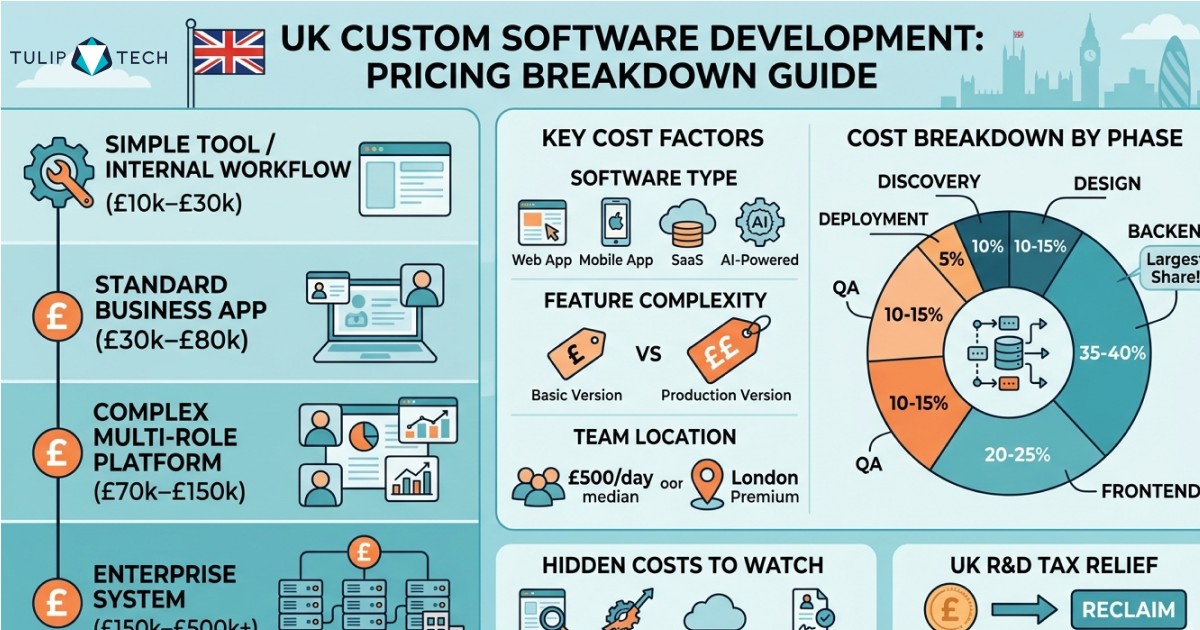
A UK app build runs £10,000 to £30,000 for a simple app or MVP, £30,000 to £80,000 for a standard business app, and £70,000 to £150,000 for a complex multi-role product, with enterprise builds beyond that. Two lines that optimistic quotes omit are project management at 10 to 15 percent and discovery at £5,000 to £12,000.
Two UK-specific costs are routinely forgotten. The first is VAT: a £60,000 UK agency build is £72,000 after 20 percent VAT, a real budget line no global guide mentions. The second is maintenance at 15 to 25 percent of build cost a year, which makes the five-year total cost roughly double the build.
Against these, most qualifying builds reclaim around 15 to 20 percent of development spend through the merged R&D scheme, per the gov.uk guidance on Corporation Tax R&D relief.
How to fund your app build
Where the money comes from shapes how you should build. A bootstrapped founder should run the leanest MVP possible and let early revenue fund the next phase, while a funded team can build wider but carries the pressure to show traction fast.
The phased route suits most: fund a focused first version, prove it works, then spend the next tranche on what the data justifies. It turns one frightening number into a series of smaller, evidence-backed decisions, and it is the most reliable way to keep an app build inside budget.
However you fund it, the ongoing cost matters as much as the build, and one line catches most founders out.
What your app maintenance budget actually buys
The 15 to 25 percent annual maintenance figure is not a slush fund; it pays for specific, unavoidable work. Operating system updates land twice a year and can break a working app overnight, so part of the budget exists just to keep pace with iOS and Android.
The rest covers security patches, server and hosting costs, third-party fees, bug fixes, and the small feature changes real usage demands. Skip it and the app does not stay still; it slowly stops working as the platforms move underneath it.
All of this sits inside the price, which is exactly why two honest quotes for the same app can look so far apart.
Why two quotes for the same app differ by tens of thousands
Founders are routinely shocked that the same brief returns quotes £50,000 apart, and the reason is not that one agency is dishonest. Each fills the gaps in the brief with its own assumptions about scope, platform, design depth, and integrations.
The cheapest quote assumes the least and renegotiates later; the dearest assumes the safest. The fix is not to haggle but to tighten the brief: a validated problem, a five-item must-have list, a named platform, and a defined integration list bring quotes within roughly 30 percent of each other.
The spec, not the developer, drives the price gap.
How to monetise the app
The revenue model shapes the build, so decide it before launch rather than after. The common routes are subscriptions, in-app purchases, advertising, a paid download, or, for B2B, licensing to the businesses that use it.
If the app sells digital goods through the stores, model the platform cut of 15 to 30 percent into the unit economics from the start, because it materially changes the maths. A subscription product needs retention engineering and self-service billing in the first version, while an ad-supported model needs the scale of users to make the numbers work, so the model and the feature set have to match.
Pick the model against your audience and your roadmap, because retrofitting revenue onto an app built without it is its own expensive rebuild. A free app with a clear path to paid usually beats a paid download that stops most users at the door.
The failure modes to design out
Five failure modes account for most UK app projects that overrun or never ship, and each has a prevention you can build in from day one.
Skipped discovery produces a fixed-price quote that rises 40 percent when real requirements emerge; prevent it by never accepting a build quote without a discovery output. Scope creep comes from a loose brief; prevent it with a signed specification and change-request pricing. Wrong platform doubles the budget; prevent it with a user-led decision.
Wrong partner surfaces at week eight; prevent it with a paid pilot and references in your sector. No project management line means missed deadlines and quality drift; prevent it by insisting PM is named at 10 to 15 percent. On the contract, settle IP ownership on payment and sign an NDA before sharing confidential detail, because owning your code and protecting your idea are not optional.
Where this leaves you
Developing an application is a sequence of good decisions in the right order, far more than it is a coding exercise. Validate before you build, choose the approach from your users, design before you code, build in sprints, use AI where it genuinely helps, and design out the failure modes that sink most projects.
Those are the best practices for application development, and the businesses that ship successful apps are rarely the ones with the biggest budget; they are the ones that spent it in the right order. If you want a UK partner who runs the process this way, our mobile app development team scopes and builds apps for UK businesses across iOS, Android, cross-platform, and web, and our MVP development for startups guide goes deeper on shipping a focused first version.
Frequently Asked Questions
What is application development?
Application development is the full process of turning an idea into working, maintained software: validating the problem, designing it, building it in sprints, testing, launching, and improving it after release. The coding is only one part; the decisions around it, scope, platform, team, and budget, decide whether the application succeeds.
How do you develop an app, step by step?
Validate the idea with real users, define and cut the scope, choose the build approach, design and prototype, build in two-week sprints, test, launch to a controlled audience, then measure and iterate. The decisions before and around the build, not the coding, decide whether the app ships on budget.
How much does it cost to develop an app in the UK?
A simple app or MVP costs £10,000 to £30,000, a standard business app £30,000 to £80,000, and a complex product £70,000 to £150,000. Add project management at 10 to 15 percent, 20 percent VAT on UK agency invoices, and 15 to 25 percent annual maintenance, which makes the five-year cost roughly double the build.
How long does it take to develop an app?
A simple app takes two to three months, a standard business app three to five, and a complex product six months or more, including discovery before and beta testing after the build. The real bottleneck is usually decision speed on the client side, not the engineering.
Does AI make app development cheaper?
AI used to build apps, through code generation and test automation, realistically trims 20 to 35 percent on suitable work, though gains shrink on complex features and still need senior review. AI features inside the app add cost rather than save it, so budget for model integration, usage-based running costs, and governance.
Should I build a native or cross-platform app?
Cross-platform with React Native or Flutter suits most first apps, covering both iOS and Android at 25 to 40 percent less than two native builds. Native is justified when the app depends on heavy hardware performance. A web app or PWA is cheaper still where app store presence is not essential.
Can I build an app without writing code?
Yes, no-code and low-code platforms can build a working app for internal tools or early validation without a developer. The limit is scale and ownership: once you need custom logic, heavy integrations, or to own the IP, you usually rebuild as custom software. Use no-code to test demand cheaply, and move to custom when you know you will grow.
Who owns the code when an agency builds my app?
Ownership should transfer to you on final payment, but only if the contract says so. Confirm in writing that you own the source code, the design files, and the documentation at handover, and that any third-party licences are assignable. An agency that resists that clause is a warning sign worth heeding before you sign.
Should I build an MVP first?
Almost always, yes. An MVP is the smallest version that tests your core assumption with real users, usually five features or fewer, so you spend the rest of the budget on what the evidence supports. Building everything at once is the most common way a first app runs out of money before it finds its market.
How do I protect my app idea?
Ideas are hard to protect, so execution matters more than secrecy. Have any partner sign a non-disclosure agreement before you share confidential detail, keep ownership of your code and accounts, and trademark the name early. A live, growing app is a stronger moat than a guarded concept.