
 Official Odoo Partner
Moving from Sage, Xero or QuickBooks to Odoo
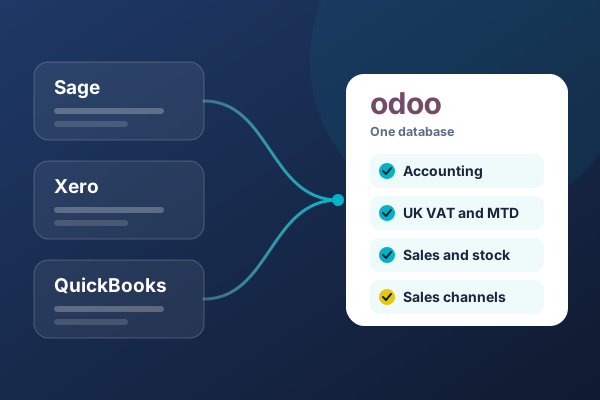
Bring your accounts into the same system as your orders, stock and sales channels. We configure Odoo's UK localisation, test your VAT returns before go-live, move the history you choose, then host and support the system afterwards.
We reply within one business day, from a real person, not a bot.
Is this you?
Who moves from Sage, Xero or QuickBooks to Odoo
Sage, Xero and QuickBooks are built to keep the books, and they do. The trouble starts when the rest of the business runs somewhere else, and the accounts only see what someone types in at the end. That is usually when a business decides to replace Sage, Xero or QuickBooks rather than add another tool beside it.
Xero raised its UK prices on 1 September 2026, and from the same date stopped applying its multi-organisation discount. A price change is a sensible moment to count every tool you pay for, not just the accounting one.
Orders typed in twice
Orders arrive through your website, a marketplace or the sales team, then someone keys them into the accounts. Each copy is another chance for a wrong price, a missed VAT code or an invoice nobody raises.Stock that does not match the accounts
The stock report says one number and the balance sheet says another, so month-end starts with a stocktake spreadsheet. With automated stock valuation switched on in Odoo, every receipt and dispatch posts to the accounts as it happens.Selling on several channels
Each marketplace keeps its own stock and its own orders, and finance sees them last. We put Stateside Distribution's Shopify, eBay, TEMU and TikTok stores behind one Odoo system, with stock synced across every channel.Read the Stateside case study →Several companies or currencies
A separate subscription or company file for every entity, inter-company recharges raised by hand and foreign currency sales converted in a spreadsheet. Odoo runs several companies in one database, each with its own books, and handles invoices and payments in other currencies.Before you switch
The five questions every switcher asks
These are the questions finance leads put to us on the first call. Each answer starts with the answer.
Do UK accounting and VAT work in Odoo?
Yes. We set up Odoo's UK localisation, which creates UK taxes with their accounts on a structure built for HMRC's nine-box VAT return, and submits your VAT returns to HMRC under Making Tax Digital. Before go-live we test the return, and the submission itself, using HMRC's test service. You connect Odoo to your HMRC account once, before your first live return. We map your existing VAT codes to Odoo's UK taxes, adjusting or adding taxes where your transactions need them while you are migrating from any other solution.
We then load a VAT quarter you have already filed into a test copy, produce that return in Odoo, and check it box by box against the figures you submitted. If you are a contractor under the Construction Industry Scheme, Odoo's CIS module applies each subcontractor's deduction rate to labour on their bills and sends your monthly return to HMRC. If you use a VAT scheme such as cash accounting or flat rate, we confirm how Odoo will handle it during scoping.
What history moves across?
You choose, and your opening balances always move. Some businesses bring across opening balances and open invoices only, others want monthly balances for year-on-year reports, and a few want full transaction history. More history means more mapping and more checking, so we help you pick the level your reporting and your accountant need. The full list is in the table below.
Can our accountant use it?
Yes, with their own login. Your external accountant works in your live books, with the access level you choose, rather than waiting for exports at quarter-end. They can review and correct entries, reconcile, check the VAT return before it goes to HMRC and post year-end adjustments, and each change is recorded against their name. We walk them through Odoo during the switch, so the first quarter-end is not their first look.
Can closed periods be locked?
Yes, with lock dates. Once a period is locked, Odoo stops anyone creating or changing an entry dated on or before the lock date. You can lock everything up to a date, lock the periods covered by a VAT return you have submitted, and set an optional hard lock that cannot be undone. If a locked period needs a correction, Odoo records it as a lock date exception rather than quietly reopening the books.
Who supports it after go-live?
We do. We host and support the Odoo systems we implement, so the team that configured your accounts is the team that answers when something needs changing. That covers user support, new apps as you grow, version upgrades, and the hosting underneath. Odoo gives each major version three years of standard support, and we plan your upgrades inside that window.
One database
What changes when your accounts sit inside Odoo
An accounting package sees the business through what reaches it. Odoo puts the accounts on the same database as sales, stock, purchasing and your channels, so the ledger is written by the work itself.
| A typical setup: accounting package plus separate tools | Odoo, as we implement it | |
|---|---|---|
| Orders | Taken in a shop, a marketplace or a spreadsheet, then keyed into the accounts | Sales orders become invoices in the same system |
| Stock | Held in a separate app or spreadsheet; the accounts see a period-end figure | Stock moves post to the accounts as they happen, with automated valuation switched on |
| Sales channels | Each one joined by its own add-on, or not joined at all | Every channel feeds one stock figure and one order flow |
| Several companies | A subscription or company file per entity | Several companies in one database, each with its own books, under one login |
| Your accountant | A login to the accounts only | A login to the same live data the business runs on, at the access level you choose |
| VAT | Making Tax Digital submission from the accounting package | Making Tax Digital submission from Odoo's UK localisation, tested before go-live |
| Adding a process later | Another subscription and another integration | Another Odoo app on the same database |
Odoo is a bigger system than a bookkeeping package. It needs configuring, and your team has to learn it. That is why a switch is a project with a dated plan and a named team, not a sign-up form.
Your data
What moves across, and what stays behind
Your opening balance always moves. Everything else is your decision, made in scoping with your accountant, before a single record is imported.
| What | Moves across? | How we handle it |
|---|---|---|
| Opening balances | Always | Imported at the cutover date and reconciled to the closing trial balance in your old system |
| Customers and suppliers | As standard | Cleaned of duplicates and dormant records before import |
| Chart of accounts | Mapped, not copied | Your nominal codes mapped to Odoo's UK chart, keeping the codes your reports depend on |
| VAT codes | Mapped | Matched to Odoo's UK taxes, then tested by producing a return for a quarter you have already filed |
| Unpaid invoices and bills | As standard | Moved as open items, so credit control and supplier payments carry on from day one |
| Products and stock levels | If you use Odoo Inventory | Counted and valued at the cutover date |
| Monthly balances for past years | Your choice | Gives year-on-year comparisons inside Odoo's reports |
| Full transaction history | Your choice | The most mapping and checking, worth it only if you will analyse that history in Odoo |
What stays behind
Before you cancel the old subscription, we export its ledgers and standard reports into an archive you own. You keep the record without paying for software just to look up something.
How we work
From separate books to one system
Know your books before we touch them
- Review of your chart of accounts, VAT codes, bank accounts and the reports your accountant relies on
- An inventory of every tool that feeds the accounts: shop, marketplaces, payroll, expenses
- A cutover date, the history you want to bring across, and a dated plan in writing
Prove the numbers before you switch
- Odoo's UK localisation configured, with your VAT codes mapped to Odoo's UK taxes
- A trial migration into a test copy, reconciled to your old trial balance
- A VAT quarter you have already filed, reproduced in Odoo and checked box by box, with the HMRC submission tested before go-live
Switch, lock, support
- Cutover at the start of a period, with earlier periods locked in Odoo
- Hosting, user support and upgrades from the team that built it
- New apps switched on when the business is ready for them
Steps
How the switch runs
- Map your books.
Nominal codes, VAT codes, bank accounts, open items and every system that feeds the ledger. Nothing is imported until the map is signed off.
- Configure Odoo for the UK.
The UK localisation, your VAT scheme, your companies and currencies, and the access levels for your team and your accountant.
- Migrate a test copy and reconcile it.
Your opening balances and chosen history go into a test system first. Your finance lead and your accountant check the trial balance against the old one until the two agree.
- Train on your own data.
Your team and your accountant rehearse real tasks in the test system: raising invoices, reconciling the bank, preparing the VAT return.
- Cut over and lock.
Final balances are imported at the cutover date, earlier periods are locked, the old system is archived, and support starts the same day.
Run
After go-live, we stay
We host and support the systems we implement. Your books do not get handed to a helpdesk that has never seen them.
Odoo provides
- The software, its releases and standard support for each major version
TulipTech provides
- Hosting, monitoring and backups for your Odoo system
- User support from the team that configured your accounts
- Version upgrades, planned inside Odoo's support window
- New apps, reports and integrations as the business grows
You and your accountant keep
- Day-to-day bookkeeping and approvals
- Sign-off of each VAT return before it goes to HMRC
- Year-end and statutory accounts
- The decision on when to lock each period
Hosting and support sit with our Managed IT and Cloud team. TulipTech is ISO 27001 and Cyber Essentials certified.
Proof
Odoo work we have delivered
Two Odoo systems we implemented, carrying real orders, real stock and real finance.
Stateside Distribution
Panaro
Official Odoo partner · ISO 27001 certified · Cyber Essentials certified · Est. 2011 · 90+ people across the UK, Bangladesh, India and the UAE, headquartered in Leicester
Straight talk
When you should stay where you are
A switch to Odoo is worth it when the accounts are only part of the problem. If they are the whole of it, you may be better off where you are, and we will tell you so.
Odoo is likely the right move if
- Orders, stock or channels live outside the accounts and someone joins them up by hand
- Your stock figure and your balance sheet rarely agree without a spreadsheet
- You run several companies or trade in several currencies and pay for a set of tools to manage it
- You expect to add sales, purchasing, manufacturing or helpdesk processes within the next year or two
You may be better off staying if
- You only need bookkeeping and VAT, and nothing else in the business is straining. A good accounting package is the right tool for that job
- A price rise is the only reason to move. If you want a cheaper Xero alternative or QuickBooks alternative for bookkeeping alone, a lighter package will cost you less than an ERP project
- Nobody in finance can give time to mapping, testing and signing off the migrated balances. That sign-off is not optional in our method
- Payroll is the only thing you want to change. That is a payroll decision, not an ERP one
If any of that rules us out, we would rather say so on the first call than after the proposal.
Before you ask
More questions about switching
Tell us what you run today
Send us the accounting package you use, how many companies you run and where your orders come from. We will tell you whether Odoo is the right move, and if it is not, we will say so. Official Odoo partner, est. 2011. We reply within one business day, from a real person, not a bot.
Book a Free Odoo Scoping Session →We build it. We run it. You grow.